Collections Overview
What is Collections?
Collections is a centralized, structured environment where you can submit, view, and manage forms for research samples, processes, and workflows. Each form is built on a standardized schema, which means your data is:
- Organized consistently across projects
- Searchable and easy to analyze later
- Re-usable for your future self and your collaborators
A Step Toward Laboratory Automation
If your lab is working toward automation, Collections is one of the first steps.
Structured, machine-readable data is the foundation for automated systems to work—whether it’s triggering a synthesis step, launching an analysis pipeline, or feeding a machine learning model. By capturing high-quality data from the start, you're setting the stage for future automation and digital integration.
How It Helps You
By using Collections:
- You stop losing track of sample information in random notebooks, spreadsheets, or chat threads
- You spend less time hunting down details later when you need to write a report, publish a paper, or submit to a data repository
- Your data becomes interoperable, making it easier to integrate with simulations, AI/ML workflows, or shared databases
How It Helps the Team
- Principal investigators and advisors can see the big picture across all experiments
- Technicians and collaborators can follow your steps and replicate your methods
- Future students or teammates can build on your work instead of starting from scratch
Map of Collections
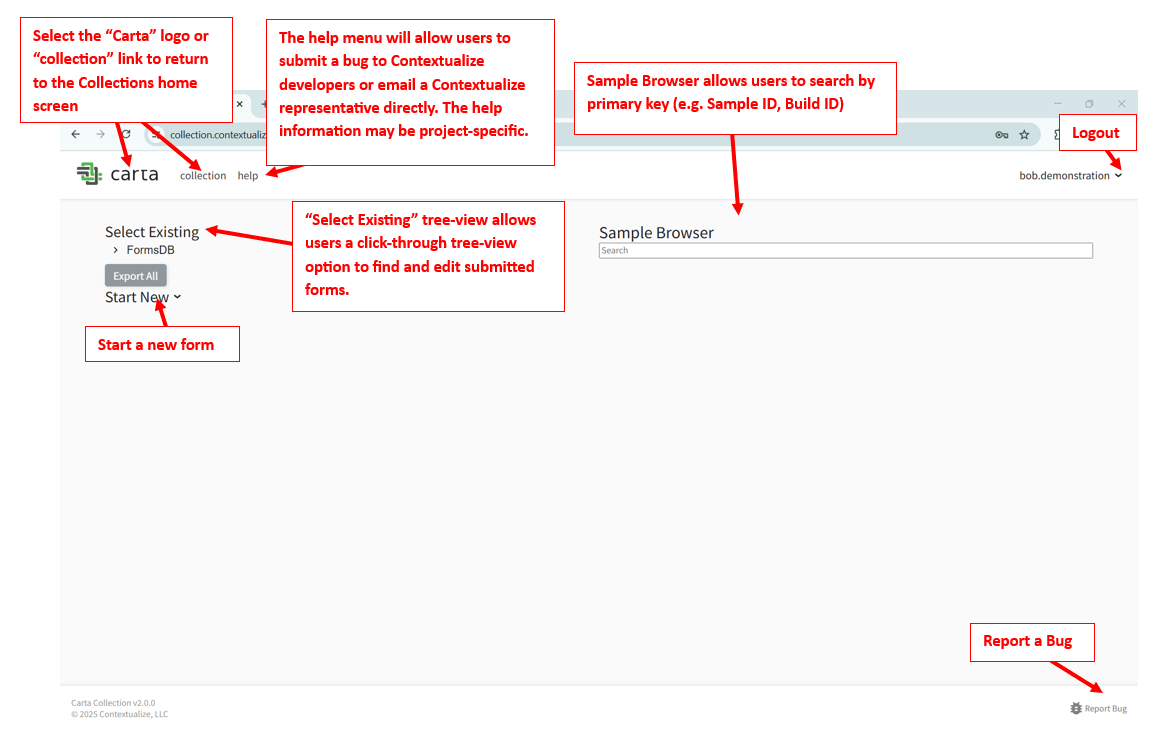
Collections in Excel
Collections in Excel is a Microsoft Excel add-in that lets you submit and update Collections forms directly from a spreadsheet. It is built for users who already work with large batches of structured data in Excel — you select a project and schema, generate a templated worksheet, fill in your rows, and submit them as Collections forms without leaving Excel.
It supports the same data as the Collections web app: dropdowns for enumerated fields, foreign-key links to other forms, array fields, conditional fields, and client-side validation before submission. Use it when you have many similar samples to log, or when your existing workflow is already spreadsheet-based.
See Collections in Excel: A Step-by-Step Guide to get started.